What is ppi?
Also known as: ppi, PPI, pixel density, pixels per inch, dots per inch
In a nutshell
What does ppi mean?
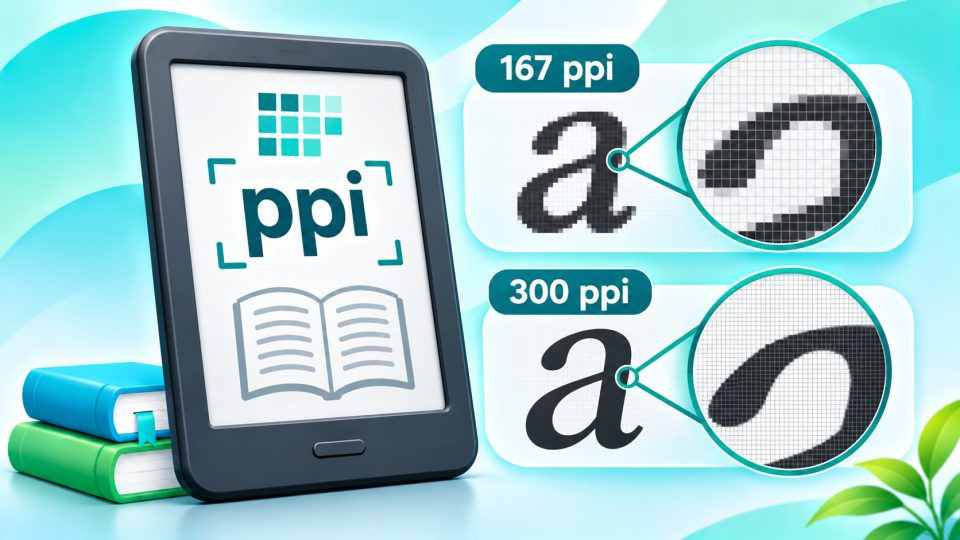
ppi is the abbreviation for pixels per inch. The value indicates how many pixels are placed side by side along a distance of one inch (2.54 cm). This is why it is also referred to as pixel density.
The higher the pixel density, the smaller and denser the individual pixels sit. For you, this means: letters have smoother edges, fine serifs are preserved, and text looks more like printed.
Why is ppi so important for eReaders?
When reading, you stare at text for hours, which is why pixel density is one of the most important specifications in an eReader's data sheet. If it is too low, letters appear slightly pixelated or jagged, especially with small text, italics, or fine fonts.
High pixel density is also noticeable with images, comics, and PDFs: details and small text in graphics remain more readable.
How tangible ppi is: eReaders compared to other screens
You best understand how sharp 300 ppi really is by comparing it with devices you use every day:
| Device | Pixel density |
|---|---|
| Full HD monitor, 24 inch (1920 × 1080) | approx. 92 ppi |
| WQHD monitor, 27 inch (2560 × 1440) | approx. 109 ppi |
| Budget Android tablet, 10.1 inch (1280 × 800) | approx. 149 ppi |
| Color on color E Ink (Kaleido 3) | 150 ppi |
| 4K monitor, 27 inch (3840 × 2160) | approx. 163 ppi |
| MacBook Air 13 inch (2560 × 1664) | approx. 224 ppi |
| Current eReader | 300 ppi |
| iPhone 4 with first Retina display (2010) | 326 ppi |
| iPhone 17 Pro (2025) | 460 ppi |
| Sony Xperia XZ Premium (2017), smartphone record | approx. 800 ppi |
A modern eReader is therefore about three times as finely resolved as a normal office monitor and twice as fine as a budget tablet. It doesn't quite reach a current smartphone, though.
The viewing distance plays a major role here: you view a monitor from about 60 cm, an eReader from 30 to 40 cm, and a smartphone often even closer. The closer you get to a screen, the higher the pixel density must be so that you no longer recognize individual pixels. For the typical reading distance of a book, 300 ppi is considered the threshold at which text appears as sharp as printed.
From 170 to 300 ppi: a brief history
The pixel density of eReaders has almost doubled in 20 years, but has hardly increased for over ten years:
| Year | Device | Pixel density | Significance |
|---|---|---|---|
| 2004 | Sony LIBRIé (Japan only) | approx. 170 ppi | First eReader with E Ink display |
| 2007 | Amazon Kindle (1st generation) | 167 ppi | Launch of the Kindle series |
| 2009 | Kindle DX (9.7 inch) | approx. 150 ppi | Large display, but lower density |
| 2012 | Kindle Paperwhite (2012) | 212 ppi | First illuminated Kindle |
| 2013 | Kobo Aura HD (6.8 inch) | 265 ppi | First "HD eReader", record at the time |
| 2014 | Kindle Voyage | 300 ppi | First eReader with 300 ppi |
| 2016 | Kobo Aura ONE (7.8 inch) | 300 ppi | 300 ppi also on large display |
| today | Kindle Paperwhite, Kobo Clara BW and many more | 300 ppi | Standard for almost all readers |
Budget entry-level models lagged behind for a long time: the basic Kindle still only had 167 ppi until 2022. Today, 300 ppi has also arrived in this class.
Records and prototypes: Can it be even sharper?
Technically, significantly higher values would be possible, but in series production they do not yet exist for eReaders:
- 2017: 400 and 600 ppi from Japan Display: In cooperation with E Ink, Japan Display showed prototypes with 400 and 600 ppi. That would be twice as sharp as today's readers. They never went into series production.
- 2018: 500 ppi from Plastic Logic: This flexible E Paper prototype also remained an exhibition piece.
- Large displays with 300 ppi: In note-taking eReaders with 10 inches and more, 300 ppi is rare because it requires a lot of pixels. The Kindle Scribe was one of the first 10-inch devices with 300 ppi.
E Ink itself says higher resolutions are feasible. The question, however, is whether readers notice the difference at all. In addition: more pixels mean more processing power during page rendering and tendentially higher power consumption.
What's next: Kaleido 4
The most exciting advance concerns color eReaders. In October 2026, E Ink introduced Kaleido 4, the successor to Kaleido 3. Officially, E Ink cites twice the color gamut, 15% brighter white tones, and 50% more contrast.
According to the specialist portal Good e-Reader, which E Ink is said to have confirmed this to, Kaleido 4 also shows color at 300 ppi, i.e. twice as fine as before. This would eliminate the biggest disadvantage of today's color eReaders. Devices with Kaleido 4 are expected in Europe no earlier than spring 2027.
How do you calculate ppi?
Pixel density results from the resolution and the screen diagonal. This is how you calculate it:
- Calculate diagonal in pixels: Square root of (width² + height²)
- Divide by the diagonal in inches
Example Kobo Libra Colour: 1264 × 1680 pixels on 7 inches
- Square root of (1264² + 1680²) ≈ 2102 pixel diagonal
- 2102 ÷ 7 ≈ 300 ppi
Example Full HD monitor: 1920 × 1080 pixels on 24 inches
- Square root of (1920² + 1080²) ≈ 2203 pixel diagonal
- 2203 ÷ 24 ≈ 92 ppi
This also shows you: a larger display needs more pixels to achieve the same sharpness. Resolution alone therefore says little; only together with the display size does it become pixel density.
Why has color E Ink only had 150 ppi so far?
Color eReaders like the Kobo Libra Colour show text at 300 ppi, but colors only at 150 ppi. The reason is the color filter, which in Kaleido 3 sits above the black-and-white display. For one color dot, several pixels are combined with red, green, and blue filters, which halves the resolution for color.
In the data sheet you will therefore often find two values, such as "300 ppi (black and white) / 150 ppi (color)". For novels this doesn't matter, but for colored comics or images the picture appears somewhat grainier. This is supposed to change with Kaleido 4.
ppi or dpi: What's the difference?
You often also read dpi (dots per inch). Strictly speaking, dpi comes from printing and describes how many color dots a printer places per inch. ppi, on the other hand, refers to the pixels of a screen. In everyday use, both terms are often used synonymously; for eReaders, ppi is the correct term.
Is more ppi always better?
Not necessarily. Pixel density is important, but not the only factor determining how pleasant your reading experience is. At least as important are:
- Contrast: Deep black on a light background makes text appear sharper. A lot has happened here with E Ink in recent years.
- Lighting: An even front light ensures a calm text appearance.
- Font and size: A well-chosen font often makes more difference than a few extra ppi.
A reader with 300 ppi and good contrast therefore often reads more pleasantly than a device with higher pixel density but a pale display.
What does ppi mean for eReaders?
ppi stands for "pixels per inch". The value indicates how densely the pixels sit on the display. The higher it is, the sharper the text appears.
How much ppi should an eReader have?
Current eReaders usually have 300 ppi. From this value on, you can practically no longer recognize individual pixels at normal reading distance. Devices with significantly fewer ppi appear visibly blurrier with small text.
Is an eReader sharper than a smartphone?
No. An eReader usually has 300 ppi, a current iPhone 460 ppi. However, an eReader is about three times as finely resolved as a normal Full HD monitor with about 92 ppi.
Which eReader was the first with 300 ppi?
The Kindle Voyage from 2014 was the first eReader with 300 ppi. Before that, the Kobo Aura HD from 2013 held the record with 265 ppi.
Will there soon be eReaders with more than 300 ppi?
Nothing has been announced for black and white, but prototypes with 400 to 600 ppi already existed in 2017. In color, E Ink's new Kaleido 4 is supposed to bring 300 ppi instead of 150 ppi for the first time; devices are expected in Europe from spring 2027.
Why does color E Ink only have 150 ppi?
With color E Ink like Kaleido 3, a color filter sits above the display. For one color dot, several pixels are combined, which is why color appears at 150 ppi but text still at 300 ppi.