Kindle Support End 2026 for Old Models
From May 20, 2026, Kindle devices from 2012 and older can no longer buy, borrow or download new books. Already downloaded e-books remain readable, and your library stays accessible via app, web and newer Kindles. We show the affected models, what still works now and how to secure your books permanently.
This page has been translated from German.
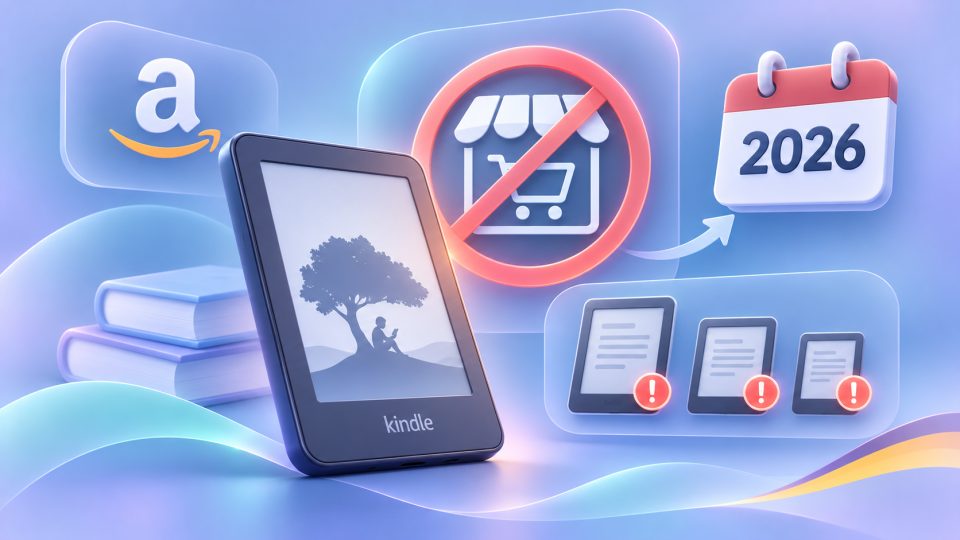
Anyone who still has an old Kindle on the shelf or the nightstand should look closely now: Amazon will shut down access to the Kindle Store on May 20, 2026 for Kindle devices and Fire tablets from 2012 and older. Your books will not disappear because of this, but the devices will no longer be able to load new ones. We explain which models are affected, what keeps working and how to secure your e-books long term.
What is Amazon changing on May 20, 2026?
On affected devices, e-books can no longer be bought, borrowed or downloaded from May 20, 2026. Amazon informed owners of older models by email in early April. Affected are Kindle e-readers and Kindle Fire tablets released in 2012 or earlier. Books already stored on the device remain readable, and offline operation keeps working.
One detail that is easily overlooked: if an affected device is deregistered or reset to factory settings after the deadline, it can no longer be registered again. It is then practically cut off from your Amazon account.
Which Kindle models are affected?
Depending on how you count, 11 to 13 models are affected, namely all Kindle e-readers up to the first Paperwhite as well as several early Fire tablets. The overview based on German media reports and Amazon information:
| Device | Release year |
|---|---|
| Kindle (1st generation) | 2007 |
| Kindle (2nd generation) | 2009 |
| Kindle DX and DX Graphite | 2009 and 2010 |
| Kindle Keyboard | 2010 |
| Kindle 4 | 2011 |
| Kindle Touch | 2011 |
| Kindle 5 | 2012 |
| Kindle Paperwhite (1st generation) | 2012 |
| Kindle Fire (1st generation) | 2011 |
| Kindle Fire (2nd generation) | 2012 |
| Kindle Fire HD 7 | 2012 |
| Kindle Fire HD 8.9 | 2012 |
Whether your device is among them can be seen in the device settings under device information or in your Amazon account under "Content and Devices". Amazon estimates that around 3 percent of active Kindle users are affected.
What still works after the support end?
Your Kindle is not e-waste, it becomes an offline reading device. This continues to apply:
- Stored books: Everything that was on the device before the deadline can be read.
- Your library: All titles bought at Amazon remain assigned to your account. You can read them via the Kindle app, Kindle for Web or a newer Kindle device.
- Your own files: Documents and e-books transferred via USB remain usable, provided the format fits.
No longer possible are buying, borrowing and downloading directly on the device as well as re-registering after a reset.
How to secure your e-books: checklist
The most important thing first: do not reset the device. Then proceed like this:
- Delete nothing: Leave the books stored on the Kindle there until you have secured them elsewhere.
- Check the library: Open your Amazon library in Kindle for Web or the Kindle app and check that all titles appear there.
- Back up locally: Many use Calibre for that, to manage and convert books on the computer. With Amazon titles, DRM often stands in the way, so inform yourself about the terms of use beforehand.
- Mind the formats: Older Kindles usually read MOBI and AZW, but not EPUB. Calibre can convert your own files, see also AZW3 and KFX.
- Test the USB transfer: You can copy your own files onto the device via sideloading. Whether USB transfer of purchased titles in your account still works is up to Amazon; check before the deadline or with support if needed.
Is there compensation or a discount?
In the US, Amazon offered affected customers 20 percent off a new Kindle and an e-book credit of 20 US dollars, valid until June 20, 2026. For Germany, reports say there is no such credit. German media mention a trade-in discount of up to 20 percent on selected Kindle models and a personalized discount code. This offer has since expired, but Amazon runs new trade-in campaigns regularly. You can find current models in our directory, for example the Kindle Paperwhite or the Kindle Colorsoft.
What are the alternatives to a new Kindle?
If you do not want to tie yourself to Amazon again, open systems offer more freedom. Readers from tolino and PocketBook read open formats like EPUB and support borrowing via the Onleihe. How library borrowing works is explained in our guide E-book libraries in Germany. Anyone staying with Amazon gets the usual comfort with a new Kindle, but stays in the Amazon ecosystem.
Why this is more than a device story
The case shows how dependent digital books are on platforms: with most shops you own a license, not a shelf. Your purchases remain, but the way to them can change. Amazon will also discontinue the Kindle PC app from June 30, 2026, according to reports. Anyone who values independence therefore builds their own collection. You can find tips in the guide Digital bookshelf. Whether the market situation changes because of this is shown in our analysis of the e-book market development.
Our conclusion
After May 20, 2026 the old Kindle is not a case for the bin, but an offline reader with a limited future. Your purchased books remain yours as long as you keep your Amazon account. Still, secure what you can, do not reset the device and decide at ease whether a new Kindle or an open system suits you better.
Frequently asked questions
Which Kindle models are affected by the support end?
All Kindle e-readers and Fire tablets released in 2012 or earlier, for example Kindle Keyboard, Kindle Touch, Kindle 4, Kindle 5 and the first Paperwhite.
Will I lose the e-books I bought?
No. Books already downloaded remain readable, and your library stays accessible via the Kindle app, Kindle for Web or a newer Kindle.
May I reset my old Kindle?
Better not. After May 20, 2026, a reset or deregistered affected device can no longer be registered again.
Can I keep reading on the old Kindle?
Yes, offline. You can transfer your own files via USB if the format fits. Older Kindles usually read MOBI and AZW, not EPUB.
Are there alternatives to the Kindle?
Yes, for example eReaders from tolino or PocketBook. They read open formats and support the Onleihe for library borrowing.