eBook Formats Explained: EPUB, PDF, AZW3 and More
EPUB is the most important ebook format: open, flexible and readable on almost every e-reader. Kindle relies on its own formats like AZW3 and KFX, PDF works best for fixed layouts and CBZ for comics. We explain each format's features, compatible devices, copy protection and how to convert files.
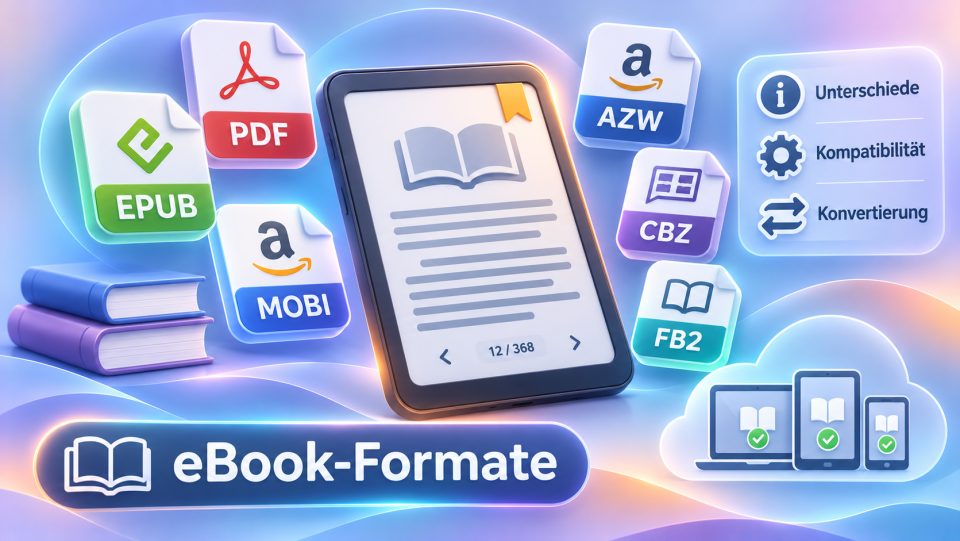
There is no single ebook format, but several file formats with different strengths. For most readers, four names matter: EPUB, PDF, Amazon's Kindle formats AZW3 and KFX, and comic archives such as CBZ. Here you will learn what they can do, which reader supports them, what copy protection means and how to convert files when a format does not fit.
Which ebook formats are there?
The common ebook formats mainly differ in whether the text adapts to the screen, who controls them and whether copy protection is possible. The overview:
| Format | Type | Strength | Typical use |
|---|---|---|---|
| EPUB | open standard | text adapts, broad support | novels, non-fiction, libraries |
| page format | fixed layout | textbooks, scans, manuals | |
| AZW3 (KF8) | Amazon | Kindle standard for purchased books | Kindle store |
| KFX | Amazon | enhanced typography on newer Kindles | Kindle store |
| MOBI | old, Amazon-related | runs on very old devices | legacy collections |
| KEPUB | Kobo | EPUB with Kobo features | Kobo devices |
| CBZ and CBR | image archive | pages as images | comics, manga |
| FB2 | open, XML | lean, common in the Russian-speaking world | PocketBook, apps |
| TXT | plain text | runs everywhere | simple texts |
A few fringe formats are less common but worth knowing: AZW is the predecessor of AZW3 and only runs on older Kindles, DOCX (Word documents) is read mainly by PocketBook devices and many apps, DjVu is a compact scan format also supported by PocketBook. HTML and RTF open directly on Kobo devices; handy if you want to read a web page or an old document on your e-reader.
What is EPUB and why is it the standard?
EPUB is the most widely used open ebook format. It is an open standard for books whose text adapts to any screen size and is maintained by the W3C. The current version is EPUB 3.3.
Typical features:
- Reflowable text: you choose font, font size and line spacing yourself, and the text reflows to fit.
- Fixed layout: for children's books or illustrated books there are also EPUBs with a fixed page layout.
- Open: publishers, libraries and shops use EPUB, which is why it is the standard format of tolino, Kobo and PocketBook. More in the glossary: EPUB.
- Copy protection possible: EPUB itself is not copy protection, but shops and libraries often protect the files with Adobe DRM or a watermark.
Important: an EPUB from a shop is not automatically readable on every e-reader. With copy protection, what counts is whether your device supports the respective DRM system.
When is PDF the right choice?
PDF is ideal when the layout should stay exactly as it is. The format displays every page in a fixed way, with tables, graphics and footnotes in their intended place. The downside: the text does not adapt to small displays, so on a 6-inch e-reader you often have to zoom or scroll. Some devices offer a reflow mode that extracts the text from the PDF. This works well for simple documents, less well for complex layouts. For novels, EPUB is the better choice; for specialist literature, lecture notes and manuals, PDF is often best.
Which formats does Kindle use?
Kindle books from the Amazon store come in proprietary formats: AZW3 (also called KF8) and the more advanced KFX. More in the glossary: AZW3 and KFX. The older MOBI is the basis of these formats but hardly matters today.
Important for your own files:
- EPUB via Send to Kindle: Amazon accepts EPUB through the Send to Kindle service and converts it internally.
- MOBI no longer: since 2022, Send to Kindle rejects MOBI files.
- PDF and Word: the Kindle displays PDFs directly and converts Word documents during transfer.
- No native EPUB import via USB: Kindle devices do not read EPUB directly, so a conversion is needed.
You can find current models at Amazon, for example the Kindle Paperwhite.
Other formats: KEPUB, CBZ, FB2, TXT and legacy formats
Besides the big formats you will come across a few special cases:
- KEPUB: Kobo's own EPUB variant with extra Kobo features such as improved reading statistics. Kobo devices often use it automatically when you transfer books via Calibre with the right plugin.
- CBZ and CBR: comic archives made of image files, which for example Kobo, PocketBook and tolino can read. They are not natively readable on a Kindle. Details: CBZ and CBR.
- FB2: open XML format, rare in Germany but widespread in the Russian-speaking world. It runs, for example, on PocketBook.
- TXT: plain text without formatting, readable on practically every device.
- Historic: LIT (Microsoft Reader, discontinued in 2012), PDB (Palm) and BBeB (Sony Reader) are phased out and only relevant for old collections.
Which format does which reader support?
The core rule: Kindle reads Amazon formats; tolino, Kobo and PocketBook read EPUB. The table summarises support roughly; the exact list depends on the model and firmware:
| Reader | Reads well | Note |
|---|---|---|
| Kindle | AZW3, KFX, PDF, EPUB via Send to Kindle | no direct EPUB via USB, no CBZ |
| tolino | EPUB, PDF, TXT, and according to the manufacturer also MOBI, CBZ and CBR | Onleihe and the tolino partner bookshops |
| Kobo | EPUB, KEPUB, PDF, MOBI, TXT, HTML, RTF, CBZ, CBR | models differ on EPUB3 |
| PocketBook | EPUB, FB2, MOBI, PDF, TXT, CBZ, CBR, depending on model DOC and DJVU | very broad format support |
For PocketBook the following applies: even if the device lists Amazon formats, DRM-protected Kindle books cannot be read on it.
What does DRM mean for ebook formats?
DRM is copy protection that determines who may open a file. It is not tied to the format but to the shop or lender. Amazon protects Kindle books with its own DRM, Apple uses its FairPlay system for Apple Books, libraries and many retailers use Adobe DRM, others rely on LCP or watermarks. An introduction is in the glossary under DRM. Circumventing copy protection is legally problematic; more on this in our guide Ebook piracy. In practice: check before buying whether your reader supports the shop's DRM system and try to keep your formats open.
What is an ACSM file?
Anyone who downloads from a library or a retailer with Adobe DRM often first receives a small ACSM file instead of the actual book. It is not an ebook but a kind of download ticket: open it with Adobe Digital Editions or a compatible reader app, sign in with your Adobe ID or, since June 2026, your ByteBooks ID, and download the protected EPUB or PDF. Then transfer the book to your e-reader via USB. You can safely delete the ACSM file itself.
How do you convert ebook formats?
You can convert your own, unprotected files with Calibre. The free program manages your library, converts between formats such as EPUB, AZW3 and PDF, and transfers books to your device. Here is how:
- Add the file to Calibre.
- Click "Convert books" and choose the target format, for example EPUB or AZW3.
- Transfer the result via USB; this is called sideloading.
Conversion works best for reflowable text. PDFs with complex layouts suffer in the process, so the original is worth keeping. Copy-protected titles from shops and libraries cannot simply be converted this way; borrowing works through Germany's Onleihe library service, more in E-book libraries in Germany.
Which format should you choose?
Your decision depends on the device and the content:
- You read novels on tolino, Kobo or PocketBook: EPUB.
- You use a Kindle: books from the Amazon store in AZW3 or KFX, your own files as EPUB via Send to Kindle.
- You read textbooks or lecture notes: PDF, with reflow or a larger device on small screens.
- You read comics or manga: CBZ, best on a large reader or a colour device such as the tolino vision color.
- You want to stay independent: open formats such as EPUB, without being tied to one shop. More in our guide on managing your digital library.
Our conclusion
For most people, EPUB is the best choice: open, flexible and readable on almost every device. Kindle users live in Amazon's formats but can upload their own files via Send to Kindle. PDF remains the specialist for fixed layouts, CBZ for comics. Anyone who wants to secure their library long-term relies on open formats and manages them with Calibre.
Frequently asked questions
Which ebook format is best?
For most e-readers, EPUB is the best choice: open, flexible and readable on tolino, Kobo and PocketBook. Kindle uses its own formats such as AZW3 and KFX.
Can a Kindle read EPUB?
Not directly via USB. Through the Send to Kindle service, Amazon accepts EPUB files and converts them internally.
What is the difference between EPUB and PDF?
EPUB adapts the text to the screen size, PDF keeps a fixed page layout. EPUB suits novels, while PDF is often better for textbooks and scans.
What is MOBI and is it still used?
MOBI is an older format on which Amazon's Kindle formats are built. It is hardly used today; Send to Kindle has not accepted it since 2022.
What is an ACSM file and how do I open it?
An ACSM file is not an ebook but a download ticket for Adobe-DRM-protected books. Open it with Adobe Digital Editions or a compatible app, sign in with your Adobe or ByteBooks ID and download the actual EPUB or PDF.
How do I convert ebook formats?
With the free program Calibre you can convert unprotected files between formats such as EPUB, AZW3 and PDF and transfer them to your device via USB.